
Discount & Promo
Create order-level promo codes and item-level discounts, then activate or deactivate them.
In FoodEase Office: Open this page
The Discount Codes page manages promotional discounts customers can receive at checkout. You can create order discounts (fixed amount or percentage off the whole check) and item discounts (price reductions on specific menu items).
You need the Create Discounts permission (CAN_CREATE_DISCOUNTS).
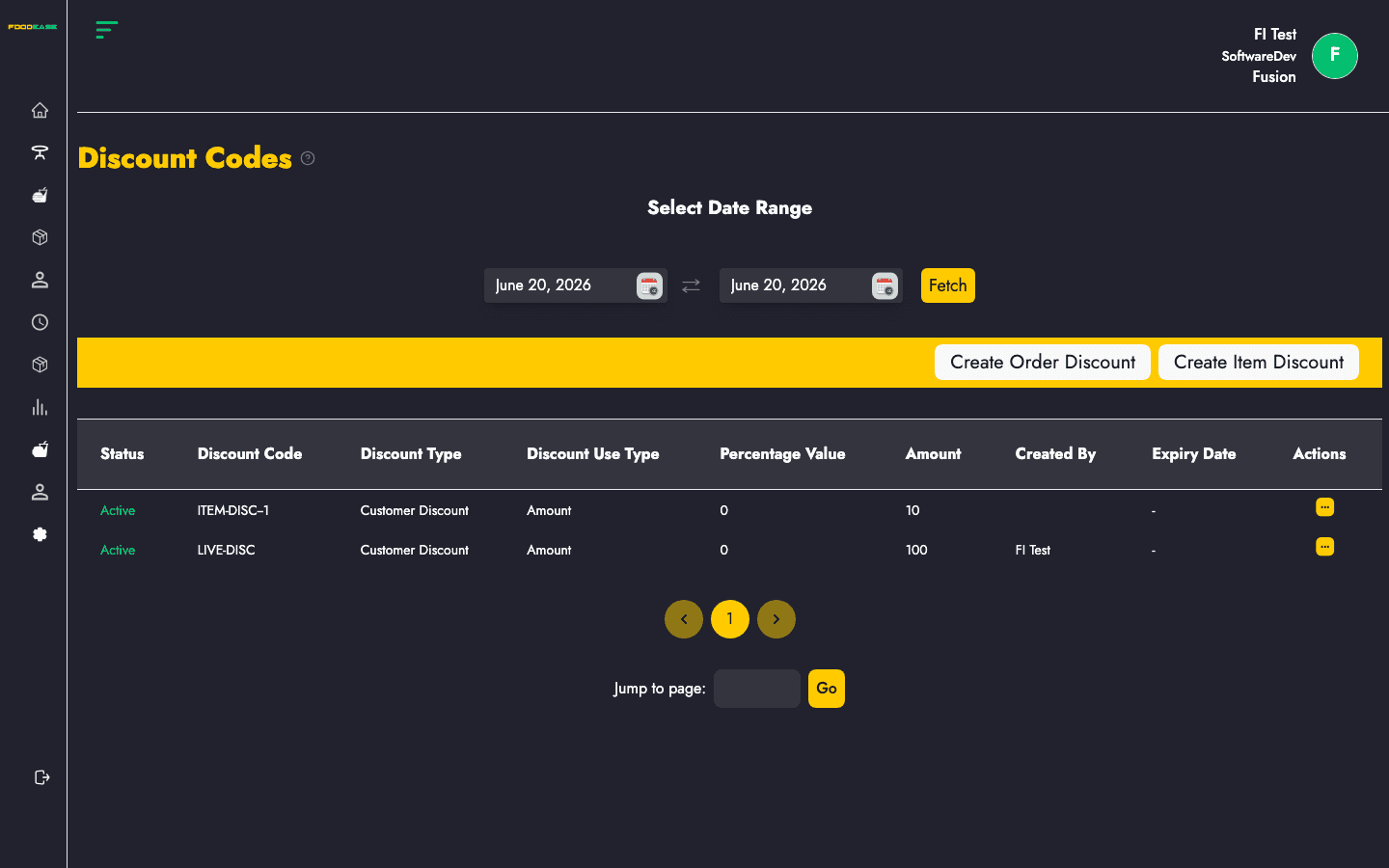
| Area | What it does |
|---|---|
| Select Date Range | Filter which discount codes appear in the list (by activity in that period) |
| Create Order Discount | Open the modal to add a promo code for the whole order |
| Create Item Discount | Open the item discount form for specific menu items |
| Table | Lists codes with status, type, value, creator, and expiry |
The table reloads with discount codes relevant to that range. The page initially loads codes for the current calendar year.
| Column | Description |
|---|---|
| Status | Active or inactive |
| Discount Code | Code name entered at POS or online |
| Discount Type | Category of discount (e.g. order vs promotional type) |
| Discount Use Type | Amount (fixed) or Percent |
| Percentage Value / Amount | Value applied — percentage or fixed amount |
| Created By | Staff who created the code |
| Expiry Date | When the code stops working (if expiry is enabled) |
| Actions | Edit or activate/deactivate |
| Field | Description |
|---|---|
| Expiry Date | Optional date and time when the code expires; if left blank, a long default expiry is used |
| Discount Code | Unique code name — must not duplicate an existing code |
| Amount or Percentage | Choose one: fixed amount off the order, or percentage of order total (cannot switch type when editing) |
| Discount Type | Select the discount category from the dropdown |
| Use count limit | Optional cap on how many times the code can be used |
On success you see Discount Code Created Successfully and the code appears in the table.
Inactive codes cannot be applied on POS.
Use this flow when the reduction applies to specific items rather than the entire order total. Configure the item, discount value, and validity according to the on-screen fields.
Item discounts appear alongside order discount codes in your discount management workflow.
SUMMER10) so cashiers can find them quickly on POS.